SPRITZ - User Manual
Carbonated Audio - v1.0.0
Curve-driven multi-effect for beat flips. VST3, AU and AAX for macOS, VST3 for Windows.
This manual covers installing SPRITZ, activating your licence, drawing curves, timing and triggers, bands, scenes, every module and the preset browser. If you only read two sections, read Quick start and Drawing curves - the curve is the whole instrument.
1. Overview
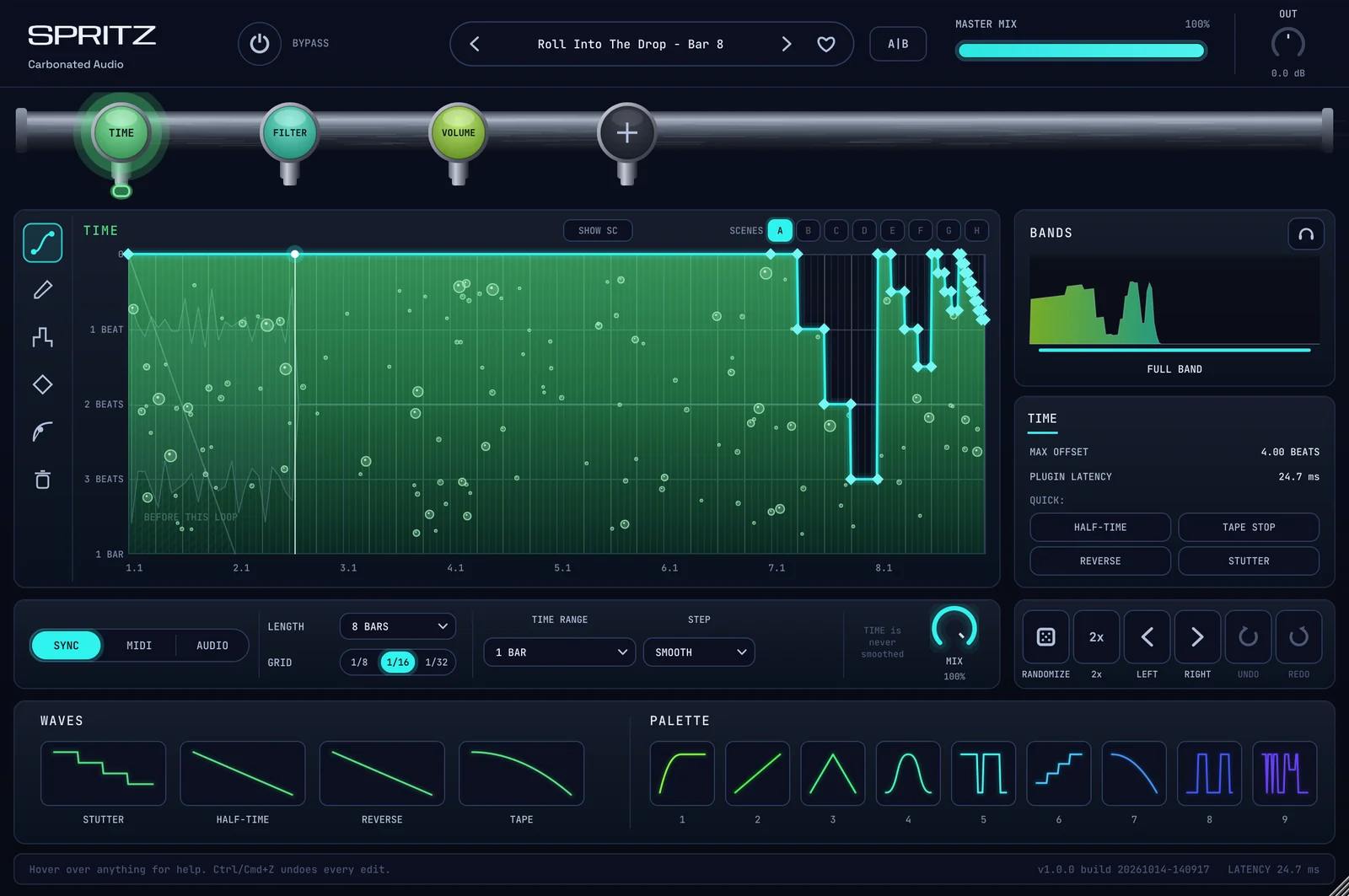
SPRITZ is a rack of effects in series, left to right. Every module in the rack follows a curve that you draw over a loop length - a beat, a bar, eight bars. The curve runs against your project tempo, so whatever you draw lands on the grid.
- Draw a ramp on TIME and the loop winds down like a tape machine. Draw steps and it stutters. Draw a slope past the grey line and it plays backwards.
- Draw a dip on VOLUME on every kick and you have sidechain pumping without routing a compressor.
- Chain modules and give each scene a different drawing, and a plain loop comes back as a new pattern every bar.
| Spec | Value |
|---|---|
| Formats | macOS: VST3, AU, AAX. Windows: VST3 |
| System | macOS 11 or later, one universal build for Apple Silicon and Intel. Windows 10 or 11, 64-bit |
| Modules | 11: VOLUME, TIME, FILTER, DRIVE, PAN, WIDTH, CRUSH, LIQUID, NOISE, PITCH, REVERB. Up to 8 in a chain, duplicates allowed |
| Bands | 1 to 4 per module, each with its own curves |
| Scenes | 8 per preset (A to H), switched by pads, MIDI or an automatic sequence |
| Presets | 912 factory presets in 18 categories, plus your own |
| Inputs | Stereo in and out, a sidechain input, and MIDI input |
| Latency | Constant 22 ms + 128 samples (24.7 ms at 48 kHz), reported to the host so your DAW compensates. An audio-triggered chain that also holds a PITCH module reports a little more |
| License | 3 machines per license. Activate once online, works offline after that |
2. Installing
- Download
SPRITZ-Installer.pkgfrom the link in your receipt email, or from the button at the top of this page. - Double-click it and follow the installer. It is signed and notarized, so macOS opens it without a warning.
- Rescan plugins in your DAW if it does not pick SPRITZ up on its own. It is listed as SPRITZ under Carbonated Audio.
| Format | Location |
|---|---|
| VST3 | /Library/Audio/Plug-Ins/VST3/SPRITZ.vst3 |
| AU | /Library/Audio/Plug-Ins/Components/SPRITZ.component |
| AAX | /Library/Application Support/Avid/Audio/Plug-Ins/SPRITZ.aaxplugin |
The AAX is signed for Pro Tools. SPRITZ is an audio effect that also accepts MIDI: to use MIDI triggers or MIDI scene keys, route a MIDI track to it (how depends on your DAW - in most hosts you pick SPRITZ as the MIDI track's output).
Installing on Windows
- Download SPRITZ-Windows-Installer.exe from the link in your receipt email or here.
- Quit your DAW.
- Run the installer. It puts the 64-bit VST3 in
C:\Program Files\Common Files\VST3\SPRITZ.vst3, the folder every VST3 host scans by default. If Windows shows a "Windows protected your PC" screen, click More info, then Run anyway. - Launch your DAW and let it rescan.
Windows is VST3 only. If your host is 32-bit or VST2-only, SPRITZ will not appear in it. To remove SPRITZ, use Settings > Apps.
3. Activating your license
The first time you open SPRITZ, the ACTIVATE SPRITZ window covers the interface.
- Copy the license key from your receipt email.
- Paste it into the field and press activate. SPRITZ contacts the activation server once.
- That's it. Every launch after that is offline - no account, no dongle, no check-ins.
Until SPRITZ is activated it passes your audio through unchanged, so nothing in your session breaks while you sort out a key.
One license covers 3 machines. To move an activation to a new computer, email mixedbysoda@gmail.com and we'll reset one. The activation record lives at ~/Library/Application Support/Carbonated Audio/spritz.activation on macOS and %APPDATA%\Carbonated Audio\spritz.activation on Windows.
4. The demo
The free demo (macOS, Windows) is the full plugin - every module, every preset, every control. Audio plays for 60 seconds, then mutes for 10, on a loop, and a banner across the top says so. The macOS demo installer includes VST3, AU and AAX; the Windows one installs the VST3.
When you buy, run SPRITZ-Installer.pkg (macOS) or SPRITZ-Windows-Installer.exe (Windows) from your receipt email. It installs over the demo; sessions you saved with the demo open in the full version.
5. Quick start
The fastest way to hear what SPRITZ does is to let a preset flip a beat.
- Put SPRITZ on a drum loop or a drum bus and press play.
- Click the preset name in the header to open the browser. Stay in Start Here and click through a few presets - a single click auditions, double-click loads and closes.
- Try Pitch-Safe Half Feel (one TIME module), then Tape Stop Beat 4 - Bar 4, then Pitch Flip 8, which steps through scenes every bar on its own.
- Pick one you like and click a tap on the rail to see its curve. Drag a point, and hear the change on the next pass.
- Use MASTER MIX in the header to blend the whole chain against the dry signal, and A/B to compare your edit with where you started.
Preset names tell you what happens and where: "Tape Stop Beat 4 - Bar 4" means a tape stop on beat 4, once every four bars.
6. The interface
| Area | What it does |
|---|---|
| Header | BYPASS (latency compensated, click-free), the preset bar (previous, name / browser, next, favourite heart), A/B, MASTER MIX and OUT (double-click OUT for 0 dB). |
| Tap rail | One tap per module in the chain, left to right. Click a tap to edit it, drag to reorder, double-click to switch it on or off, right-click to duplicate, replace or remove. + adds any of the 11 modules, up to 8 in a chain. |
| Curve editor | The curve for the selected module, the tool strip on the left, scene pads top right, and the input and output scope behind the curve, locked to the loop. |
| Bands | A live spectrum with draggable splits. Click a band to edit its curves. |
| Module panel | Readouts and quick moves for the selected module (on TIME: max offset, plugin latency, and HALF-TIME, TAPE STOP, REVERSE and STUTTER shortcuts). |
| Control bar | Trigger (SYNC, MIDI, AUDIO), LENGTH, GRID, the module's own settings, SMOOTH and the module's MIX. |
| Edit buttons | RANDOMIZE, 2x, LEFT, RIGHT, UNDO, REDO. |
| Waves / Palette | Ready-made shapes for the selected module, and nine palette slots of your own, shared by every SPRITZ instance. |
| Help bar | Hover over anything and the bottom line explains it. The right side shows the version and the current latency. |
The window can be resized from the bottom-right corner, from 60% to 200%. Ctrl/Cmd+Z undoes every edit, up to 200 steps.
7. Drawing curves
The horizontal axis is one pass of the loop (its LENGTH). The vertical axis is the module's parameter: level on VOLUME, playback position on TIME, cutoff on FILTER, and so on. The top of the editor is the module's "untouched" setting on most modules.
Tools
| Tool | Use |
|---|---|
| EDIT | Drag points, drag a line to bend it, double-click to add or delete a point, drag empty space to select several. Right-click a point for its weight and segment shape. Shift = fine. |
| DRAW | Paint the curve freehand, snapped to the grid. Shift = no snap. |
| STEP | Paint steps on the grid - gates, chops and pitch steps. |
| BEND | Drag a line up or down to curve it. Double-click a line to cycle Curve, S-Curve, Hold and Ramp. |
| WEIGHT | Click a point to cycle Hard (exact), Medium (click-free) and Soft (rounded). |
| CLEAR | Reset this curve to neutral. Undo brings it back. |
Points and segments
Each point has a weight: Hard lands exactly (and can click on a jump), Medium is exact but click-free, Soft rounds the corner. Each line leaving a point has a shape: Curve, S-Curve, Hold (a step) or Ramp. On TIME, Ramp is a true speed glide - the cleanest way to draw a tape stop.
Grid, smoothing and quick moves
- GRID sets the snap resolution for drawing and moving points. Hold Shift for no snap.
- SMOOTH rounds every corner of the curve without moving it off the grid.
- RANDOMIZE writes a new rhythmic curve for the module. On TIME it builds real stutters, reverses and stops.
- 2x repeats the curve twice in the same length. LEFT and RIGHT move it one grid step earlier or later.
- Right-click empty space for Invert, Mirror (reverse in time), Select all and Reset curve.
Waves and palette
WAVES holds ready-made shapes for each module (143 across all eleven), grouped by category - stutters, half-times, reverses, tape ramps and more. Click one to load it into the curve. The PALETTE has nine slots of your own: right-click a slot to store the current curve there, or to reset it to the factory shape. The palette is shared by every SPRITZ instance.
Reading TIME
TIME has a grey reference line. A curve that runs parallel to it holds the playback still (a stop), a curve steeper than it plays backwards, and the flat top of the editor plays the loop normally. The hatched area at the bottom is audio from before the current loop. SHOW SC draws the sidechain input along the loop so you can line a curve up with the kick.
8. Length and triggers
LENGTH is how long one pass of the curve lasts: 1/16, 1/8 T, 1/8, 1/8 D, 1/4 T, 1/4, 1/4 D, 1/2 T, 1/2, 1/2 D, 1 BAR, 2 BARS, 4 BARS, 8 BARS or 16 BARS. Each module can have its own length, so a 3-beat curve against a 4-beat curve gives you a polymeter.
The trigger decides what restarts the curve:
| Trigger | Behaviour |
|---|---|
| SYNC | Locked to the host tempo and bar position. With the transport stopped the curve keeps running at the project tempo. |
| MIDI | Each MIDI note restarts the curve. Pick the channel (ALL CH or 1 to 16). In PITCH mode, hold a note to set the loop rate from the note. |
| AUDIO | Hits in the input restart the curve. EXT IN listens to the sidechain input instead (route a kick to SPRITZ's sidechain). Detection: DRUMS for beats, GENERAL for anything, COMPLEX listens to low, mid and high separately. SENS sets how small a jump in level counts as a hit, THRESHOLD ignores hits quieter than the setting. |
ONE SHOT plays the curve once per trigger and holds at the end, instead of looping.
9. Envelope follower
Every module except VOLUME has an envelope follower that lets the input level push the curve, on top of what you drew.
- ENVELOPE on / off.
- AMOUNT: how far the input level moves the curve. Negative moves it the other way.
- ATTACK and RELEASE: how fast the envelope rises and falls back.
- THRESHOLD: the level where the envelope starts to act.
- ADD or MULT: the envelope adds to the curve, or the curve is scaled by the envelope.
- Source: this band, the full input, or the sidechain input.
Example: a drawn filter sweep that also opens a little more on every snare.
10. Bands
Right-click the bands panel to split a module into 1 to 4 bands. Drag the handles on the spectrum to move the splits, and pick 6, 12 or 24 dB / oct for the crossover slope. Click a band to edit its curves - each band has its own. The headphone button solos the selected band.
By default the bands share one LENGTH and trigger (Bands share one LENGTH / trigger in the menu). Switch that off to run each band on its own timing.
Example: tape-stop the lows while the highs keep rolling, in one TIME module.
11. Scenes
A preset holds up to eight scenes, A to H. Scene A is the base; each other scene stores the curves and settings that differ from it. That is how one preset can play a clean bar, then an octave drop, then a roll, then a reverb throw.
- Pads: click a pad to switch scenes. Right-click a pad to edit that scene without switching to it, start it as a copy of A, or clear it.
- Switch on (in the pad menu): switches land Immediately, on the next 1/16, beat, half bar, bar or 2 bars, so nothing jumps mid-hit.
- MIDI keys: with MIDI keys C# to G# switch scenes on, the notes C#, D, D#, E, F, F#, G and G# in any octave select scenes A to H.
- AUTO: presets with a sequence play their scenes as an 8-bar pattern on their own. Switch AUTO off to play the scenes yourself with the pads or MIDI.
12. The modules
Every module has its own curve (two on some), its own MIX against the signal coming into it, and the trigger, length, envelope and band controls above.
| Module | Curves | Settings |
|---|---|---|
| VOLUME | Level over the loop (centre = -6 dB): pumps, gates, chops and swells | TRIM -24 to +24 dB |
| TIME | Playback position: stutters, half-time, reverse, tape stops | TIME RANGE (LINKED to the loop, or 1/4 beat to 8 bars of look-back), STEP (INSTANT, SMOOTH 3 ms, SOFT 12 ms) |
| FILTER | CUTOFF and RESONANCE | TYPE (CLEAN or WARM; LP, HP, BP, NOTCH, PEAK; 6, 12 or 24 dB), STEREO offset -24 to +24 st, DIST (WARM only), SAFE RES |
| DRIVE | Drive amount | STYLE (soft, smooth and hard clip; soft and hard square; soft and hard rectify; skew, sine, triangle, saw and extreme fold), IN -12 to +24 dB, OUT -24 to +12 dB, GRIP, TONE. Oversampled, with automatic gain compensation |
| PAN | Pan position (top = right, bottom = left) | LAW (BALANCE 0 dB, POWER 3 dB, 4.5 dB, LINEAR 6 dB, STEREO), HAAS amount, DELAY 1 to 40 ms |
| WIDTH | Stereo width (bottom = mono, middle = unchanged, top = extra wide) | KEEP LEVEL |
| CRUSH | Bit depth and sample rate (top = untouched) | JITTER, DITHER, ANTI-ALIAS |
| LIQUID | Centre and feedback | MODE (FLANGER or PHASER), STAGES 2 to 16, SPREAD, INVERT |
| NOISE | Noise level | TYPE (WHITE, PINK, BROWN, VINYL, TAPE, FIZZ, DIGITAL, RAIN), ONLY (noise without the input), MONO. The envelope makes it follow or duck the music |
| PITCH | Pitch, -24 to +24 semitones (middle = no change), tempo unchanged | GRAIN 10 to 32 ms (longer = smoother on bass and pads, shorter = tighter on fast material), SNAP to whole semitones. Every detected hit starts on its step |
| REVERB | SEND (into the reverb) and DRY (dry level) | DECAY, SIZE, PRE 0 to 250 ms, DAMP, WET -24 to +12 dB, GATE |
The same module can appear more than once in a chain - for example a low-pass FILTER and a high-pass FILTER side by side.
13. Presets
SPRITZ ships with 912 factory presets in 18 categories: Live Flip, Beat Flip, Half-Time & Speed, Stutter & Repeat, Builds & Transitions, Reverse, Tape & Vinyl, Scratch, Pitch, Space & Throws, Sidechain, Gates & Trance, Filter Motion, Drive & Color, Stereo & Movement, Texture & Lo-Fi, Mixing and Sound Design. Start Here collects 29 of them, ordered so the first ones change the beat in bar one.
- Click the preset name to open the browser. Click to audition, double-click to load and close, Up / Down to browse. Search covers names and tags.
- The heart marks a favourite. The arrows either side of the name step through the current category.
- Save your own sounds as user presets. They are stored in
Documents/Carbonated Audio/SPRITZ/Presets. - Your DAW also sees the factory presets as host programs, with Start Here first.
14. Host automation
| Parameter | Range |
|---|---|
| Bypass | On / off |
| Master Mix | 0 to 100% |
| Output | -24 to +24 dB |
| Scene | A to H |
| Slot 1-8 On | Each module position on or off |
| Slot 1-8 Mix | 0 to 100% per module position |
| Slot 1-8 Offset A / Offset B | -100 to +100%, shifts the module's first and second curve up or down |
Slots follow the order on the tap rail. Automating the Scene parameter is the simplest way to write a flip into an arrangement.
15. Recipes
Half-time drop for one bar
Load Pitch-Safe Half Feel, then automate Master Mix (or the TIME slot's On switch) so it only plays on the bar before the drop.
Sidechain without a sidechain
Add VOLUME, set LENGTH to 1/4, and draw a dip at the start of each beat. Or browse the Sidechain category. For a pump that follows a real kick, set the trigger to AUDIO with EXT IN and route the kick to SPRITZ's sidechain.
Tape stop into the chorus
Add TIME, set LENGTH to 4 BARS, keep the curve at the top until the last beat, then draw a Ramp down to the bottom. Set STEP to SMOOTH.
Reverb throw on the last beat
Add REVERB, keep SEND at the bottom, spike it on beat 4 and push WET up so the tail rings over the next downbeat.
A flip you play live
Turn on MIDI keys C# to G# switch scenes, set Switch on to Next beat, and play scenes from a MIDI keyboard or pad controller.
16. Troubleshooting
| Problem | Fix |
|---|---|
| SPRITZ does nothing to my audio | It is not activated yet - open the interface and enter your key. Also check BYPASS, Master Mix and that the modules on the rail are switched on. |
| Activation fails | Check the key was pasted whole, and that this computer is online for the one-time activation. If all 3 machines are in use, email us for a reset. |
| The demo mutes every minute | That is the demo. Install the full version from your receipt email after buying. |
| MIDI triggers or scene keys do nothing | Route a MIDI track to SPRITZ and check the MIDI channel in the control bar. Scene keys need MIDI keys C# to G# switch scenes on in the pad menu. |
| "NO SIDECHAIN SIGNAL" | The module listens to EXT IN or the envelope listens to the sidechain, but nothing is routed to SPRITZ's sidechain input. Route a track to it in your DAW. |
| Everything sounds a little late | Make sure your DAW's plugin delay compensation is on. SPRITZ reports its latency (shown in the help bar) and stays constant while you change presets. |
| The flip is out of time | Check the trigger is SYNC and that your project tempo and bar 1 are where you expect. Scene sequences count from song bar 1. |
| SPRITZ doesn't show up in my DAW | Rescan plugins and look for SPRITZ under Carbonated Audio. Check the format is in the folder listed in Installing. SPRITZ needs macOS 11 or later, or 64-bit Windows 10 or 11 with a VST3 host. |
| Is there a Windows version? | Yes, VST3 for 64-bit Windows 10 and 11. See Installing on Windows. No Windows AAX yet. |
17. Support
License resets, bug reports, install trouble, or a question about what SPRITZ will do to a particular part - mixedbysoda@gmail.com. Include your DAW, your macOS or Windows version and the plugin format if it's a technical problem; it saves a round trip.
Product page and purchase: carbonatedaudio.com/spritz.