
FOAM
The reverb that makes room.
Big tails bury vocals. FOAM gets out of the way while the dry signal is playing, then blooms back in the gaps - locked to your tempo, with zero latency.
The interface
One window. Nothing hidden.
Every control is on the front panel. The cloud in the middle is drawn from the reverb's own output, so what you see moving is what you hear.
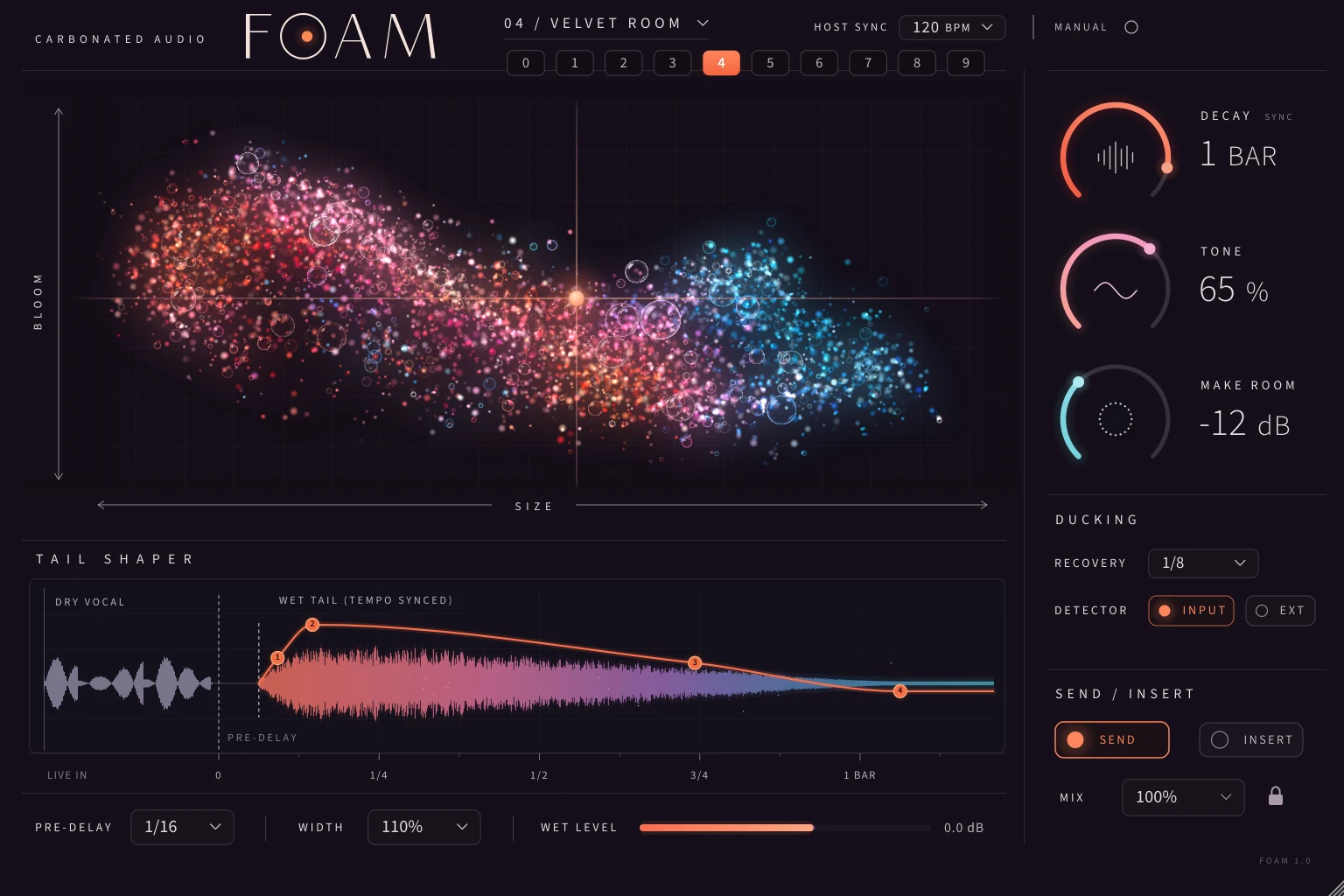
Actual plugin interface, rendered by the plugin.
A long reverb sounds huge. It also sits on top of every word. So you turn it down, and now it sounds small. FOAM is built around that fight - all the space, none of the mud.
Make Room
It ducks so you don't have to.
While the source is playing, FOAM pulls its own reverb down. When the source stops, the tail comes back up. The reverb is still ringing underneath the whole time, so nothing is cut off - it is just out of the way.
- Make RoomHow far the reverb drops while the source is present. Up to 36 dB.
- RecoveryHow quickly it returns. Set it in note values to breathe with the track, or in milliseconds.
- DetectorListens to FOAM's own input by default, so there is no routing to set up. Switch to EXT to key it from any other track.
Illustration of the behaviour. Move the sliders.
Size x Bloom
Shape the room with one hand.
Size and Bloom live on one XY field. Drag across for a bigger room, drag up for a denser, more diffuse one. Decay holds its length while you move, so you are changing the character of the space, not the timing of the track.
Bloom 50% SizeBloom
Ten factory spaces, 0 to 9. A space sets the room; it never touches your routing, mix or ducking. This cloud follows your pointer - the one in the plugin follows the audio.
Tail Shaper
Draw the tail you actually want.
Most reverbs give you a decay time and that is it. FOAM lets you move four points on the tail itself, drawn against your dry signal on a tempo grid.
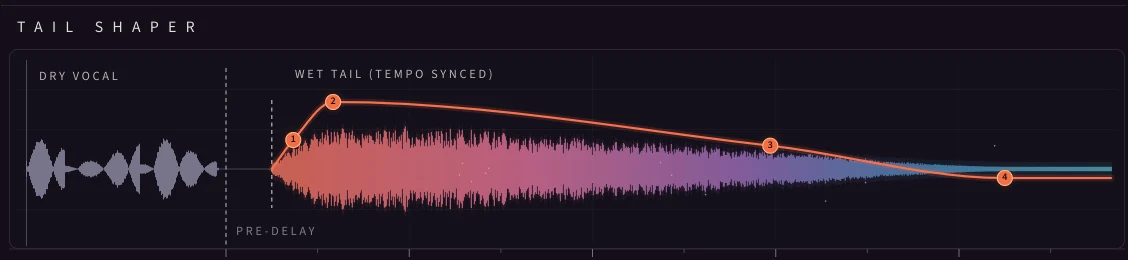
Onset
The level of the early reflections - how hard the room answers right after the source.
Build
How long the body of the tail takes to arrive. Short for a tight room, long for a slow swell.
Body
How much of the long tail you get against the short front of the reverb, and where one hands over to the other.
Decay
Where the tail lands. Drag it along the grid to set the Decay time by eye instead of by number.
Tempo
A tail that ends on the beat.
Set the reverb in bars and beats instead of guessing in seconds. Change the project tempo and the whole reverb follows.
Decay
The length of the tail, in note values or from 0.2 to 20 seconds.
Pre-Delay
The gap before the reverb starts. Synced, or 0 to 500 ms. It crossfades when you move it, so it never bends pitch.
Recovery
How long the ducked reverb takes to come back. Synced, or 10 ms to 2 seconds.
The rest
Built to sit in a real session.
0samples
Zero latency
No lookahead anywhere in the path. Nothing to compensate, nothing to drift.
Send/ Insert
Works on either
Send gives you reverb only for an aux return. Insert gives you an equal-power mix on one control.
200%
Width
Narrow the reverb to mono or push it wide. Level-compensated, so wider does not just mean louder.
Tone
One knob for the top end
Darkens how the highs decay as well as how bright the reverb is, the way a real room does.
10spaces
Start somewhere good
From a tight booth to an endless wash, on ten buttons. Then make it yours.
<1% CPU
Light
Under 1% of one core, measured on an Apple M4 at 48 kHz. Put it on as many sends as you like.
Own it
One-time. No subscription, ever.
- VST3, AU and AAX for macOS 11 or later
- Universal build for Apple Silicon and Intel, signed for Pro Tools
- Three machines on one license
- No dongle, no account
- Works offline after one activation
Secure checkout by Stripe. Your license key and download arrive by email right away.
Questions
Before you buy.
Is FOAM only for vocals?
No. It was built around the vocal problem - a long tail that buries the words - but the same trick works on anything with gaps in it: snares, guitars, keys, synth stabs. Anywhere you want a big space that stays out of the way of the source.
Do I have to set up sidechain routing to get the ducking?
No. By default the detector listens to FOAM's own input. Put FOAM on a send, feed it the vocal, and the reverb ducks whenever the vocal is there. If you want something else to push the reverb down, switch the detector to EXT and route a sidechain to it.
Send or insert?
Both. In Send mode FOAM outputs reverb only, which is what you want on an aux return. In Insert mode you get an equal-power dry/wet mix on one control. Switching between them never changes the reverb itself.
Does it add latency?
No. FOAM reports zero samples of latency. There is no lookahead anywhere in the signal path.
What does tempo sync cover?
Decay, pre-delay and the ducking recovery can each be set in note values and follow your project tempo. Each one can also be switched to free time in seconds or milliseconds. If the host gives no tempo, FOAM uses the manual BPM you set.
How many computers can I use it on?
Up to 3 machines with one license. No dongle and no account. Activate once online and it works offline after that. To move an activation, email mixedbysoda@gmail.com and we will reset it.
What formats and systems?
VST3, AU and AAX on macOS 11 or later. One universal build for Apple Silicon and Intel, signed and notarized, with the AAX signed for Pro Tools. FOAM is macOS only right now.
Is there a Windows version?
Not yet. FOAM is macOS only at launch.
Is there a demo?
Not yet. If you want to hear it on your own session before buying, email mixedbysoda@gmail.com.
Can I get a refund?
All sales are final. If an order is broken, never arrived, or was charged twice, email mixedbysoda@gmail.com and it will be fixed.